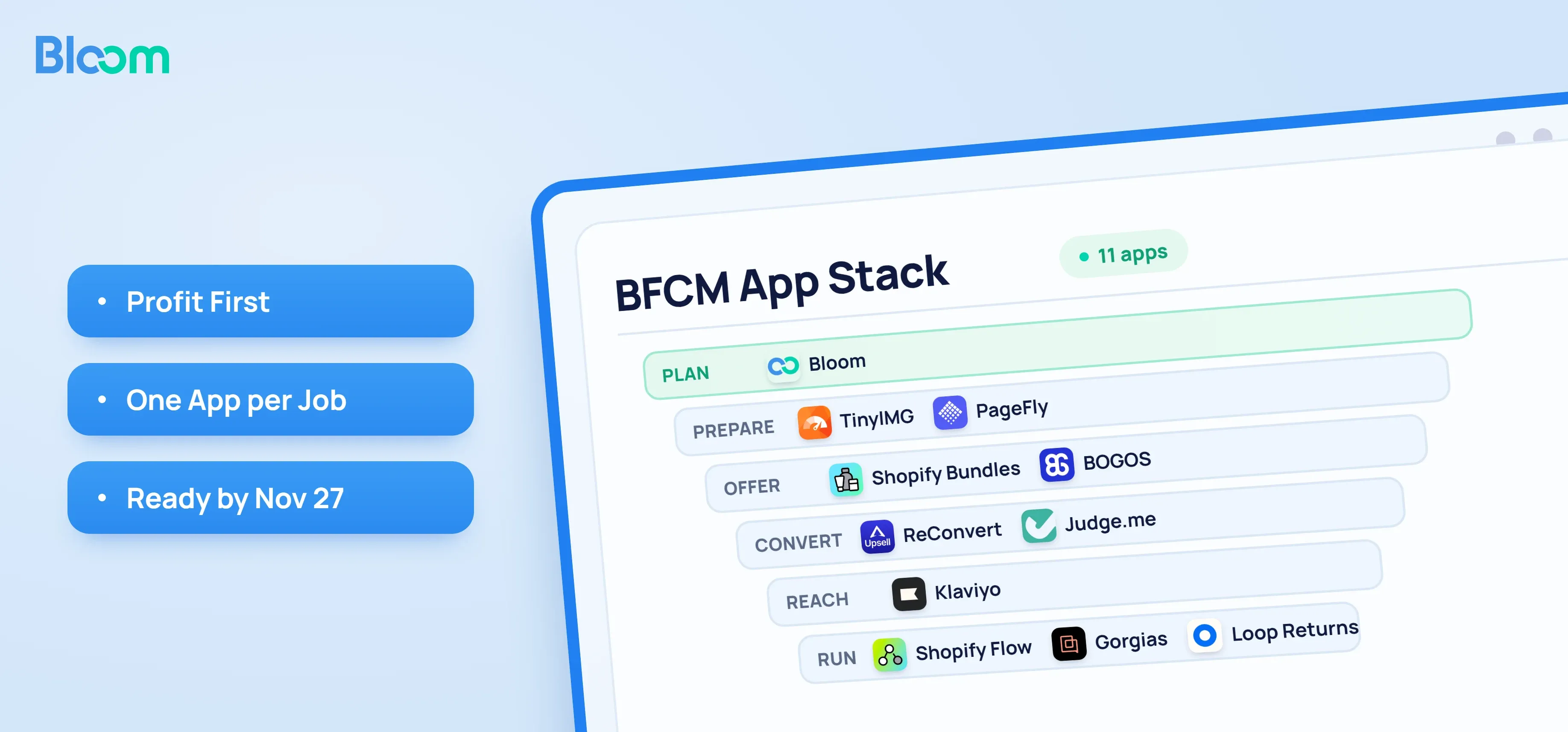


The best Shopify Black Friday apps cover the jobs that decide BFCM: a fast store, a strong landing page, bundles and offers that lift order value, email and SMS to customers you already have, reviews, support, returns, and profit analytics that show whether all of it made money. You need one good app per job, not one of everything.
Most Shopify Black Friday app lists stop at sales. This one starts with profit. A discount that halves the profit on each order, or an ad that sells at a loss, can turn a record sales weekend into a weak one. So the first app on the list is the one that tells you which products, ad platforms, channels and markets can afford a BFCM offer.
The rest are grouped by the BFCM checklist: speed, design, bundles, discounts, upsells, email and SMS, reviews, automation, support and returns. Each entry covers what the app does for BFCM, how to set it up, the profit trap to avoid, and when to skip it.
Black Friday 2026 is on November 27 and Cyber Monday on November 30. Only add apps you can install and test before then. Anything else, plan for Cyber Week or BFCM 2027.
The best Shopify Black Friday apps at a glance
| # | App | BFCM job | Best for | Skip it if |
|---|---|---|---|---|
| 1 | Bloom | Profit analytics | Knowing which products, ad platforms, channels and markets make money | You already track profit after all costs by product, order and campaign |
| 2 | TinyIMG | Site speed | Compressing images before traffic peaks | Your pages already load fast on mobile |
| 3 | PageFly | Landing pages | A dedicated BFCM landing page without a developer | Your theme already has a flexible sale page |
| 4 | Shopify Bundles | Bundles | Fixed bundles and multipacks, free | You need mix-and-match bundles |
| 5 | BOGOS | Discounts and free gifts | BOGO offers and gifts with purchase | Your offers are simple codes Shopify can run natively |
| 6 | ReConvert | Post-purchase upsells | One-click add-ons after checkout | Your catalog has nothing that pairs with a first purchase |
| 7 | Klaviyo | Email and SMS | Segmented early access and cart recovery | Your list is small and Shopify Email covers it |
| 8 | Judge.me | Reviews | Social proof on product and landing pages | You already collect and display reviews |
| 9 | Shopify Flow | Automation | Tagging, stock alerts and order routing, free | Your order volume is low enough to handle manually |
| 10 | Gorgias | Customer support | Answering order questions fast during peak week | One inbox handles your support today |
| 11 | Loop Returns | Returns | Turning holiday refunds into exchanges and store credit | Your return rate is low |
Disclosure: Bloom is our app. Every other app on this list is independent and was chosen for the BFCM job it does.
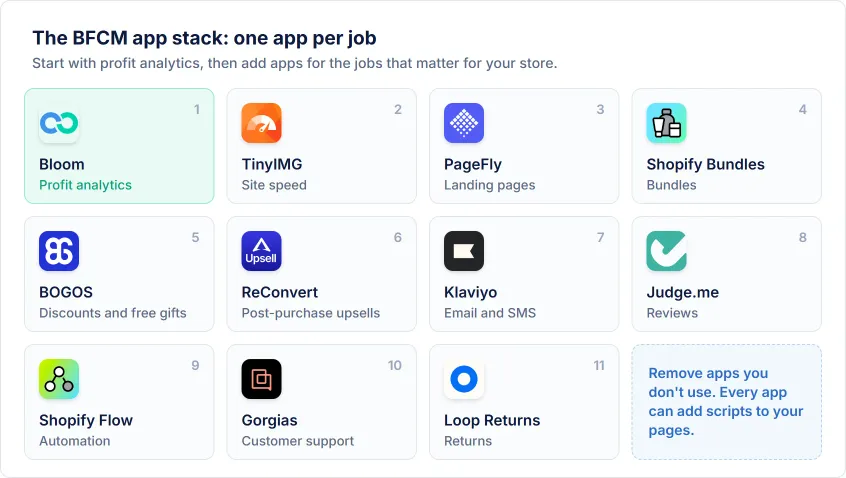
How to choose BFCM apps without slowing your store
Every app you add can load its own scripts, and BFCM is when page speed matters most. Choose with four rules:
- One app per job. Two upsell apps or two popup apps compete on the same page and slow it down.
- Install a week early. Test each app with real orders on mobile, then freeze your theme and apps a few days before Black Friday.
- Remove what you no longer use. Uninstalled apps can leave code in your theme, so check for leftovers.
- Ask what each app does to profit. Apps that add offers, gifts or discounts cut margin on every order they touch. Check the numbers before you switch them on.
The app list below follows that last rule. It starts with the numbers.
1. Bloom: profit analytics for BFCM
BFCM job: know what can afford a discount before you offer one, and see what actually made money during and after the sale.
Bloom is a Shopify-native profit analytics and marketing attribution app. It brings product costs, fulfillment, fees and ad spend together, so you see profit at every level, not just revenue. For BFCM, that answers three questions most stores guess at.
Find your profitable products, ad platforms, channels and markets
Before you set offers, Bloom shows Gross Profit and Contribution Margin by product, by country and by marketing channel. That tells you:
- Which products to push and which to protect. High-margin products can carry a deeper offer. Bestsellers with thin margins need bundles, not discounts.
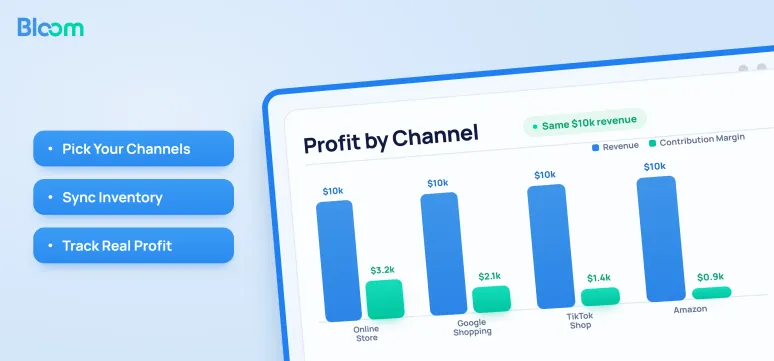
- Which ad platforms and channels earn profit, not just sales. Bloom's attribution shows real sales by campaign, not the conversions each ad platform estimates, plus the profit from retention email.
- Which markets to include in BFCM. Country Profits shows Gross Profit and Profit Margin by country and flags markets below your margin threshold, before shipping and ad costs eat the discount.
Check order profitability so discounts don't cost you more than they earn
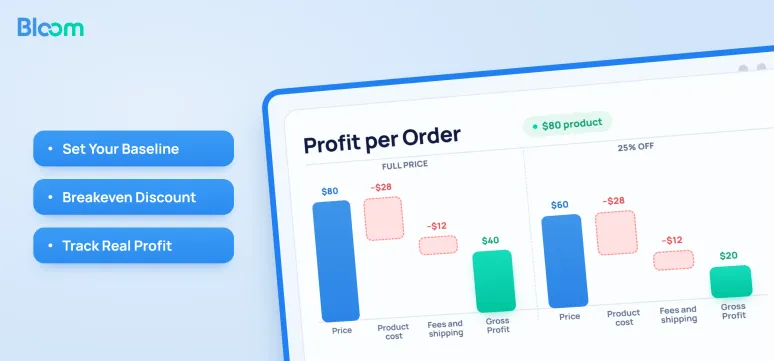
A 25% discount on an $80 product with $40 in costs halves Gross Profit per order, from $40 to $20. Bloom's order-level profit breakdown shows what each order kept after discount, product cost, shipping and fees. Use it to set a discount ceiling for each product, then check daily during BFCM that orders stay above it.
Check the unit economics of your ads
During BFCM, ad costs usually peak and every platform claims credit for the same orders. With ad spend and real sales in one place, you can compare each campaign's profit with its spend and watch MER (Marketing Efficiency Ratio: total revenue divided by total ad spend) against your breakeven. If a campaign sells at a loss, you see it while there is still time to pause it.
Setup tip: enter all your costs before November 27, so BFCM profit is accurate from the first order. During the sale, Bloom Daily Pulse gives you instant daily highlights on your store's numbers.
Skip it if: you already track profit after every cost, by product, order, campaign and country.
New to the metrics? Start with Shopify Metrics to Track for BFCM.
2. TinyIMG: site speed
BFCM job: keep pages fast when traffic peaks.
Large product and banner images are one of the most common reasons Shopify pages load slowly on mobile, and BFCM adds new sale banners on top. TinyIMG compresses images and adds alt text, which helps both speed and image search.
Setup tip: compress your BFCM banners and landing page images before launch, then test the landing page on a mid-range phone over mobile data, not office Wi-Fi.
Profit trap: none directly, but a slow page wastes the ad money you pay to send people there.
Skip it if: your images are already optimized and your key pages load quickly on mobile. Removing an unused app often does more for speed than adding one.
3. PageFly: BFCM landing pages and design
BFCM job: give BFCM traffic one dedicated page instead of your homepage.
PageFly is a drag-and-drop page builder for Shopify. Use it to build a BFCM landing page with the offer at the top, then bestsellers, bundles, gift ideas and shipping cutoff dates, without waiting on a developer.
Setup tip: keep the page light: one hero image, no stacked popups, and the offer and delivery dates visible without scrolling on mobile. Send every BFCM ad and email to this page.
Profit trap: a landing page that leads with your thinnest-margin products. Feature products that can carry the offer.
Skip it if: your theme already has a flexible sale or collection page you can customize. GemPages is a similar alternative.
4. Shopify Bundles: bundles and multipacks
BFCM job: raise order value without deepening the discount on every item.
Shopify Bundles is Shopify's free app for fixed bundles and multipacks. Bundles are one of the cheapest BFCM levers: Shopify's average BFCM cart rose to $114.70 in 2025, and a bundle lets a shopper spend more while you discount the set, not each product.
Setup tip: pair a popular low-margin product with a high-margin one, and price the bundle so its Gross Profit beats selling the bestseller alone at your BFCM discount.
Profit trap: bundling two products that already sell well together anyway. You give away margin on orders you would have won at full price.
Skip it if: you need mix-and-match or tiered bundles. Look at Fast Bundle instead.
5. BOGOS: discounts, BOGO offers and free gifts
BFCM job: run offers Shopify's built-in discounts can't, like buy-one-get-one and gifts with purchase.
BOGOS handles BOGO deals, free gifts and gift-with-purchase thresholds. A free gift often feels more generous to shoppers than a percentage off, while costing you only the gift's product cost.
Setup tip: use a low-cost, high-perceived-value item as the gift, and tie it to a spend threshold just above your normal average order value.
Profit trap: gifts and BOGO offers that stack with discount codes. Check discount combinations so one order can't collect every offer at once.
Skip it if: your BFCM offer is a simple code or automatic discount, which Shopify handles natively.
6. ReConvert: post-purchase upsells
BFCM job: add revenue after the shopper has already decided to buy.
ReConvert adds one-click upsells after checkout and customizes the thank-you page. The add-on costs nothing extra to acquire, because you already paid for that visit.
Setup tip: offer a complementary, higher-margin product at a modest discount. Keep it to one offer, so you don't slow down the order confirmation.
Profit trap: upselling another discounted bestseller. Pick add-ons with margin to spare.
Skip it if: your catalog has no natural add-on for a first purchase. Rebuy and AfterSell are alternatives with cart and checkout upsells.
7. Klaviyo: email and SMS
BFCM job: sell to customers you already have, at almost no cost per order.
Klaviyo uses your Shopify data to segment email and SMS. For BFCM, that means early access for your best customers, cart and browse recovery, and last-call messages on Cyber Monday. Owned channels are your cheapest sales during the week ad costs peak.
Setup tip: send early access to repeat customers first, and warm up sending volume over the weeks before BFCM so messages don't land in spam.
Profit trap: sending your deepest offer to customers who would buy at full price. Segment offers by customer value.
Skip it if: your list is small and Shopify Email covers what you send. For SMS-led brands, Attentive and Postscript are dedicated alternatives.
8. Judge.me: reviews and social proof
BFCM job: give skeptical deal shoppers a reason to trust the offer.
Judge.me collects and displays product reviews, including photo and video reviews, and has a free plan. Shoppers comparing deals lean on reviews to decide.
Setup tip: show review counts on your BFCM landing page and product cards, and time review requests for after the product arrives, so this year's orders become next year's social proof.
Profit trap: none directly. Reviews raise conversion without touching price.
Skip it if: you already collect and display reviews well. Loox is an alternative focused on photo reviews.
9. Shopify Flow: automation
BFCM job: handle repetitive work automatically when order volume spikes.
Shopify Flow is Shopify's free automation app. Build simple rules before BFCM: tag high-value orders, alert the team when a bestseller runs low, hide sold-out products, or flag orders that look risky.
Setup tip: set a low-stock alert for your highest-margin products first. Running out of them on Black Friday is the most expensive mistake of the weekend.
Profit trap: none directly. Automation saves time and prevents oversold orders.
Skip it if: your order volume is low enough to manage by hand.
10. Gorgias: customer support
BFCM job: answer questions fast enough to save the sale.
Gorgias is a helpdesk that pulls Shopify order data into each conversation, so your team can answer "where is my order?" and sizing questions without switching tabs. During BFCM, slow answers cost sales.
Setup tip: write saved replies for shipping cutoffs, returns, gift receipts and order changes before the weekend, and route email, chat and social messages into one inbox.
Profit trap: none directly, but refunds given to end an argument add up. Set clear rules for when the team can offer credit.
Skip it if: one shared inbox handles your support today. Tidio is a lighter live chat option.
11. Loop Returns: returns and exchanges
BFCM job: keep revenue when holiday returns arrive in December and January.
Loop Returns runs a self-serve returns portal that steers customers toward exchanges and store credit instead of refunds. BFCM profit isn't final until returns come in, and apparel, one of Shopify's top BFCM categories, has high return rates.
Setup tip: offer a small bonus for choosing an exchange or store credit, and publish an extended holiday returns window clearly. Easy returns also help shoppers commit to the order.
Profit trap: free return shipping on low-margin discounted orders. Check what a return costs against the order's Gross Profit.
Skip it if: your return rate is low. AfterShip Returns is an alternative.
Your BFCM app stack by store stage
You don't need all 11 apps. Start with the jobs that lose the most money when they go wrong, then add the rest as you grow.
| Store stage | Core stack | Add when you're ready |
|---|---|---|
| New store, first BFCM | Bloom, Shopify Bundles, Judge.me, Shopify Flow, Shopify Email | PageFly for a dedicated landing page |
| Growing store with an email list | Bloom, PageFly, Shopify Bundles, BOGOS, Klaviyo, Judge.me | ReConvert for post-purchase upsells |
| Established brand with high volume | Bloom, TinyIMG, PageFly, Klaviyo, ReConvert, Judge.me, Shopify Flow | Gorgias and Loop Returns for peak-week support and holiday returns |
Whatever the stage, set up profit tracking first. Every other app on this list changes what an order earns, and only profit data shows whether that change helped.
For the full BFCM plan, see the Shopify BFCM guide. For the numbers behind the season, see Shopify BFCM Statistics.
See which BFCM offers make money, on Bloom’s free plan.
Frequently asked questions
What apps do I need for Black Friday on Shopify?
Cover the jobs that decide BFCM: profit analytics, site speed, a landing page, bundles and offers, email and SMS, reviews, support and returns. One good app per job is enough, and many stores can start with free Shopify apps like Shopify Bundles, Shopify Flow and Shopify Email.
What is the best discount app for Black Friday on Shopify?
For simple codes and automatic discounts, Shopify's built-in discounts are enough. For BOGO offers and gifts with purchase, use a dedicated app like BOGOS. Whatever you use, check discount combinations and set a discount ceiling per product so offers don't cost more than they earn.
What is the best bundling app for Black Friday on Shopify?
Shopify Bundles is free and handles fixed bundles and multipacks. For mix-and-match or tiered bundles, Fast Bundle is a popular alternative. Price each bundle so its Gross Profit beats selling the bestseller alone at your BFCM discount.
Do Shopify apps slow down my store during BFCM?
They can, because many apps load their own scripts on your pages. Install only one app per job, test on mobile before Black Friday, remove apps you no longer use, and freeze app changes a few days before the sale.
How do I know if my BFCM apps paid off?
Measure profit, not revenue. Compare Contribution Margin during BFCM with your normal weeks, after discounts, gifts, upsells, ad spend and returns. Apps that raised order value without cutting margin paid off. Apps that only added discounted orders may not have.